
How to Choose the Right Label Inspection System for Your Rewinder or Slitter?
Putting a 100% label inspection system on an existing slitter or rewinder is one of the best ways to prevent bad prints from getting to customers. But don’t treat this upgrade as easily as a consumer webcam purchase.
If you go with an off-the-shelf vision system without considering your machine’s specifics, you’ll end up with expensive hardware that either slows down your line or floods your screen with false alarms.
To make sure your inspection system works on the shop floor, don’t just read the generic brochures and focus on five specific factors related to mechanics and operations.
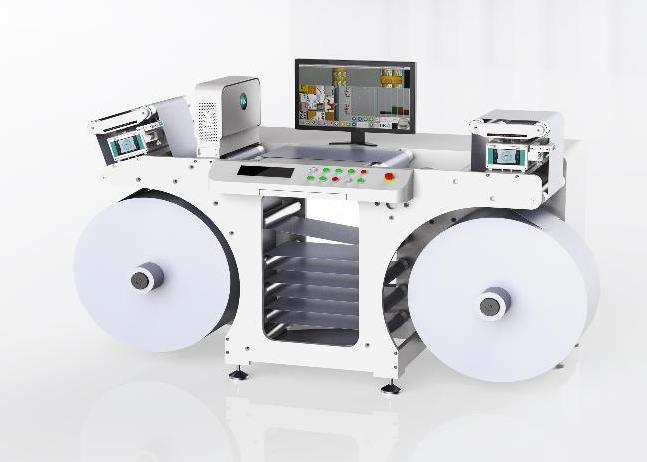
Table of Contents
Will the Print Inspection System Suit Your Existing Machinery?
Space issues are always the first problem you face. Older slitters, rewinders, and narrow inspection tables weren’t designed with extra space for heavy cameras and big lights.
Measure carefully before ordering anything. Standard line-scan camera setups need a certain distance between the lens and the moving material, along with room for the LED light bars.
- When looking for cameras, go for compact, split hardware setups. Modular boxes are key if space is tight. Plus, systems using mirrors to bend light paths let cameras fit flatter or sideways, not sticking up.
- Keep an eye on the web width too. Make sure the camera’s field of view matches your machine’s max width. If your slitter handles 330 mm or 450 mm webs, choose lenses to cover every millimeter. Missing this could mean blurry edges and constant false alarms on the outside.
- Always place the camera over a solid roller. Fast-moving webs can bounce, creating vibrations. These make crisp images turn fuzzy and useless. So, cameras should be looking at material just as it goes over a solid roller.
Can the Label Inspection System Keep Up?
A big mistake is purchasing a system solely based on its static resolution without considering its real-time processing speed. If your slitter works well at 300 meters per minute but the inspection system can only manage 150 meters per minute, the software starts skipping frames. You’re essentially working blind on half of the roll.
Make sure the camera’s internal speed matches your shop’s production speeds. For high-end pharma or cosmetics, you typically need a sharp resolution around 0.1 mm per pixel. At 300 meters per minute, this means the camera has to capture over 50,000 pictures of lines each second.
If the computer processor or cables (like Camera Link or 10 GigE) can’t keep up with this flood of data in real time, you might be forced to slow your machines way down. This seriously drops your daily output.
Defect Detection Capabilities: What Do You Need to Catch?
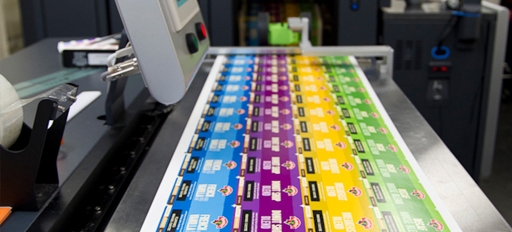
Don’t buy a system that treats every print job the same. The software should identify the specific mistakes your clients reject.
- First off, basic print faults like ink splashes, streaks, and dead hickeys require a classic “pixel-by-pixel” comparison against a clean reference label.
- For color fading during long print runs, get a system with a 3-chip RGB line-scan camera and calibrated LEDs. This setup measures tiny color shifts (Delta-E drift) the human eye won’t catch.
- If you work with variable data and barcodes in the logistics or pharma industry, spot checks aren’t enough. The system needs active OCR/OCV to verify serial numbers and read QR codes. It must match them against your master CSV database at full line speed.
- Finally, die-cut errors, like matrix bleed or waste left on the liner, can jam clients’ label applicators. So, the system must have edge-detection tools to monitor those physical cut lines.
How Does the System Interact with the Slitter?
Finding an error is no help if the machine just keeps going. The inspection software needs to hook right up to the slitter’s PLC.
So, when the camera spots a problem, the software figures out the exact distance from where the lens is to your splicing table. It measures this by counting pulses from a super-accurate rotary encoder attached to the web drive.
- Precision Stopping: When the system spots a defect, it sends a quick 24V stop signal to the slitter’s drive. The slitter slows down smoothly but fast, stopping the faulty label exactly where the operator can reach it on their splicing board. If it stops too soon or too late, though, the operator has to manually move the machine back and forth, which wastes time—minutes for each mistake.
- Flagging and Mapping: In continuous processes where halting messes up the material tension, the setup needs to hook up to an inkjet marker or flag applicator. This way, edges get marked, or a “defect map” is saved for sorting out issues later on with a secondary rewinder.
For compatibility, ensure your supplier offers a wiring diagram that fits your machine’s controls.
Ease of Use & Software Interface
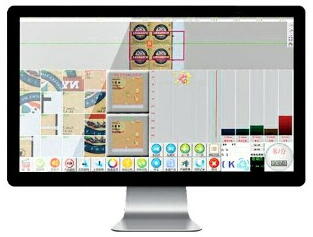
If your inspection system needs a software engineer to set up each new task, your staff will just disable it. High employee turnover means that if the user interface is too complicated, machines might sit unused.
So insist on a simple “one-click setup” process. Operators should be able to initiate a new job by merely running a fresh label set past the camera once. Then, the software should automatically set that as the master “golden” template, detect the print repetitions, and establish the tolerances all in under two minutes.
The daily runtime screen needs to be straightforward to read.
- For the Live Defect Gallery, show a side-by-side comparison of the defect and the master image. That way, operators can quickly tell if a flagged issue is a true print failure or just a speck of dust on the liner.
- For Zoned Tolerances, operators can draw a box around key spots, like barcodes or logos, making those areas super sensitive. They can then lower the sensitivity in solid-color backgrounds to avoid pesky false alarms.
Retrofitting a slitter-rewinder with an inspection system is an investment in your shop’s reputation. It involves considering the physical space, data handling, proper PLC braking, and user-friendly screens. This way, the system catches defects while avoiding slower delivery times. So, you keep customers happy and improve quality control too.