
How to Choose Camera Resolution for a Print Inspection System?
When designing a printing inspection system, choosing the appropriate camera resolution is of vital importance. A resolution that is too low may fail to identify minute defects, while a resolution that is too high will increase the system cost, processing requirements, and data load.
So, should one choose 4K, 8K, or a multi-camera system?
The choice mainly depends on three factors: the minimum defect size, the inspection width, and the production line speed. By considering these three factors comprehensively, one can ensure the reliability of the inspection while avoiding unnecessary costs.
What Camera Resolution Do You Actually Need?
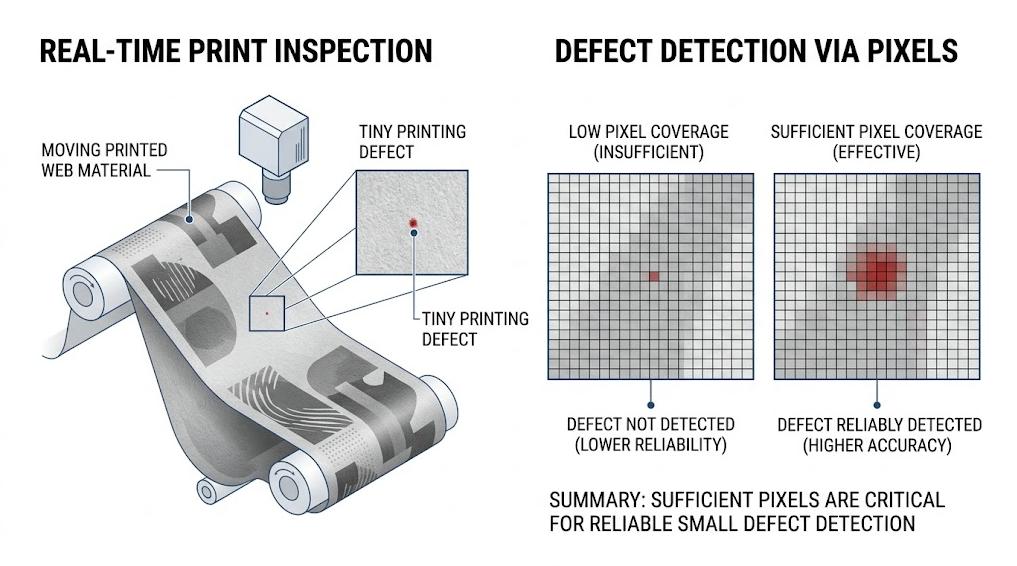
The detection should start from the smallest defect size that needs to be detected, rather than just considering the nominal resolution of the camera.
The target defects in printing inspection may include missed ink dots, broken lines, stains, pinholes, text defects or registration deviations. The smaller the defect, the more pixels are usually required.
For example, if a 0.2 millimeter defect needs to be detected and it is desired that the defect occupies at least 4 pixels, the required spatial resolution:
0.2 millimeter ÷ 4 pixels = 0.05 millimeter/pixel
That is to say, the detection area needs to achieve a spatial resolution of approximately 0.05 millimeter/pixel.
Therefore, choosing the highest-resolution camera is not necessarily appropriate. The camera resolution should be determined based on the actual defect size.
How Does Inspection Width Affect Resolution?
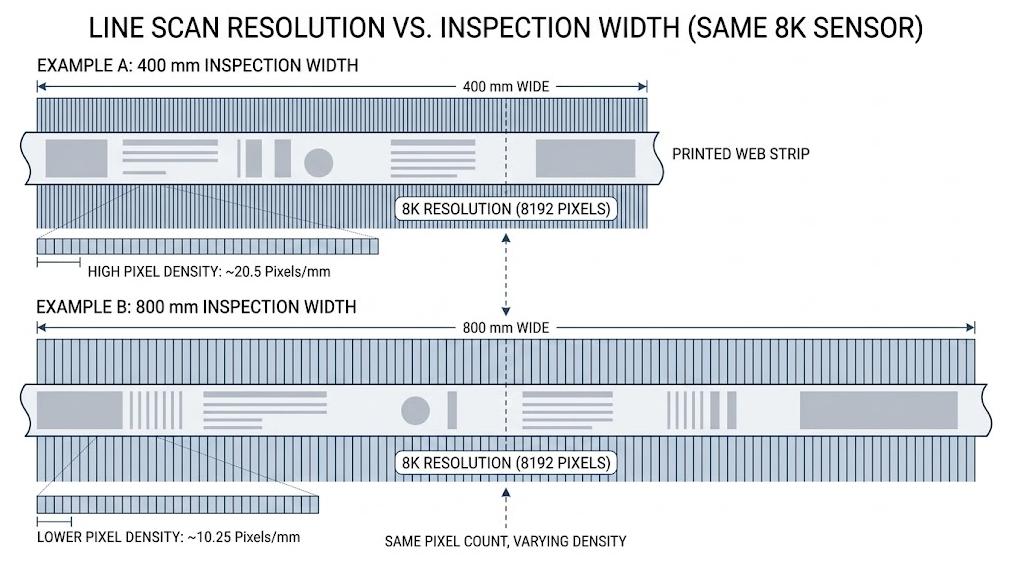
After determining the required resolution, the detection width also needs to be taken into account.
For a linear array scanning printing inspection system, the camera resolution is directly related to the detection width. The calculation formula is as follows:
Required camera resolution = Detection width ÷ Required spatial resolution (mm/pixel)
For example, if the detection width is 600 mm and a resolution of 0.05 mm/pixel is required:
600 ÷ 0.05 = 12,000 pixels
Therefore, a single 8K camera cannot achieve the precision of 0.05 mm/pixel while covering the full width of 600 mm. Depending on the specific requirements, the camera configuration may need to be adjusted or a multi-camera solution may be adopted.
In addition, the actual detection performance of the same camera will vary in different fields of view (FOV):
| Camera Resolution | Inspection Width | Approx. Resolution |
| 4K | 400 mm | 0.098 mm/pixel |
| 8K | 400 mm | 0.049 mm/pixel |
| 8K | 800 mm | 0.098 mm/pixel |
The key is to evaluate the camera resolution while considering the detection width.
Is 4K or 8K Better for Print Inspection?
There is no single resolution that is suitable for all scenarios, and 8K is not necessarily superior to 4K.
When the width of the detection area is narrow and the minimum defect size is not particularly small, a 4K linear array camera is usually sufficient, and it can also reduce system costs and image processing requirements.
If a higher spatial resolution needs to be maintained over a wider area, or if small defects, fine text, and complex patterns need to be detected, an 8K camera will have an advantage.
For example:
- 4K: Suitable for narrow formats and medium resolution requirements
- 8K: Suitable for wide formats or higher precision detection
- Multi-camera solution: Suitable for high-resolution wide-format detection
When choosing a camera, one should not merely pursue a higher pixel count, but rather ensure that the pixel count is sufficient to reliably identify the smallest defects within the target detection width.
What Does Printing Speed Have to Do With Camera Resolution?
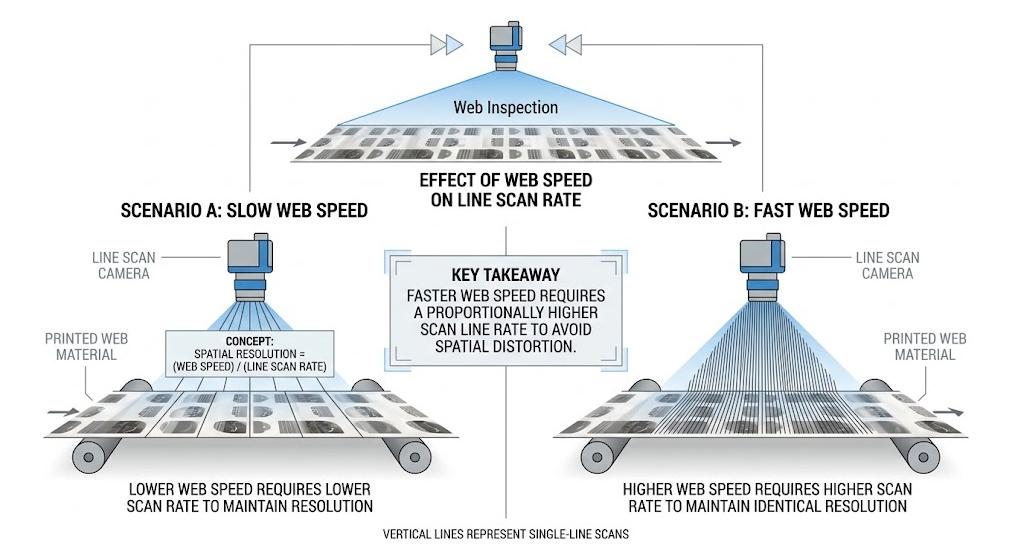
Camera resolution is only one of the selection factors. The running speed of the roll material is also important. In continuous printing, the roll material usually runs at a high speed. Linear array cameras need to capture images at a sufficiently high line frequency in order to maintain the required spatial resolution during the movement of the material.
For example:
- Sheet material speed: 100 meters/minute
- Required spatial resolution: 0.1 millimeters/pixel
100 meters/minute is approximately equal to 1,667 millimeters/second. The required line frequency is approximately:
1,667 ÷ 0.1 = 16,670 lines/second
Therefore, the camera and detection system need to support a line frequency of approximately 16.7 kHz.
This means that even if the camera has a sufficiently high pixel resolution, it may not be suitable for high-speed printing production lines.
When choosing a printing inspection system, it is recommended to provide the supplier with three key parameters:
- Maximum sheet material width
- Highest line speed
- Minimum defect size
Providing these specific parameters is more helpful for selecting the appropriate camera and detection system compared to simply requesting “4K or 8K”.
How Can You Choose the Right Camera for Your Printing Line?
The practical camera selection process can be summarized into the following five steps:
1. Determine the minimum defect size
Identify the smallest printed defect that needs to be detected, such as 0.2 mm.
2. Determine the pixel coverage
If a 0.2 mm defect needs to be covered by at least 4 pixels, the target spatial resolution is approximately 0.05 mm/pixel.
3. Calculate the required camera resolution
Calculate the number of pixels required based on the target spatial resolution and the actual detection width.
4. Confirm the production speed
Ensure that the camera line rate can meet the maximum running speed of the largest sheet size.
5. Determine the complete system configuration
Select a 4K or 8K linear array camera, multiple camera combinations, as well as matching lenses, lighting, and image processing hardware according to the application requirements.
Although camera resolution is important, it is not the only factor determining the detection performance. Lenses, lighting, running speed, material properties, and image processing capabilities all need to be matched with the actual application.
Are you unsure which camera resolution is suitable for your printing production line? Please provide your sheet width, running speed, and minimum defect size. Our team will assist you in determining the appropriate camera resolution and the configuration of the printing inspection system.